
Open the transcript on YouTube
- Open the video on youtube.com.
- Click the description under the video to expand it (…more).
- Scroll down to the Transcript section and click Show transcript.

A panel opens next to the video with every line and its timestamp. Click a line to jump to that moment, search for a word at the top of the panel, and switch the language at the bottom if the video has subtitles in several languages.
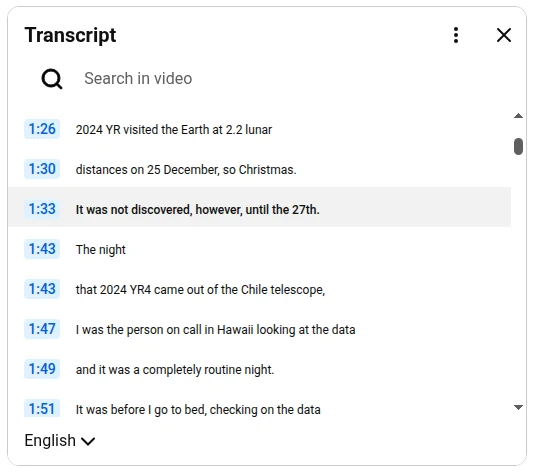
To copy the text, select it with the mouse and press Ctrl+C (⌘+C on a Mac). For a long video that means scrolling through the whole panel, and the timestamps come along with the text.
Copy or export the whole transcript
I work with transcripts every day, so I built Subtitles Tool for YouTube™. It shows the full transcript in a panel next to the video and lets you take all of it with one click.

- Install Subtitles Tool for YouTube™ from the Chrome Web Store.
- Open any YouTube video and click the SUB button in the player controls.
- Click Copy to copy the whole transcript, or Export to save it as a file. Format switches between SRT, VTT and TXT.
- Turn Timestamps on or off: copied and exported text follows this switch.
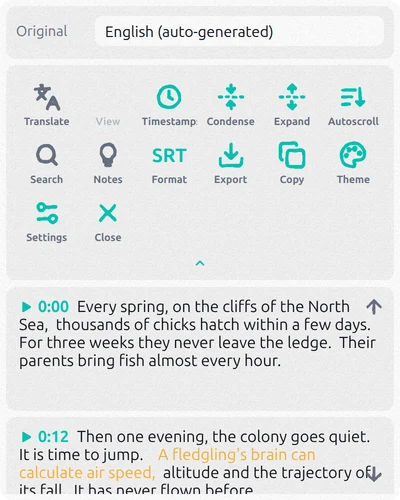
The same panel translates subtitles into more than 150 languages and shows them under the original, finds any word in the video with Search, and makes AI notes of the video with Notes. It’s free to start; heavy use needs a paid plan inside the extension.
There’s no Show transcript button
A transcript is built from subtitles. If a video has no subtitles at all, neither its own nor auto-generated, YouTube has nothing to show. This happens with music videos, very short clips, videos without speech and some live streams. Check the CC button in the player: if it’s missing, there are no subtitles either.
Auto-generated subtitles also take a while to appear after an upload, so for a brand-new video try again later.
Questions
Can I get a YouTube transcript without timestamps?
In YouTube’s panel the timestamps are copied along with the text. In Subtitles Tool for YouTube™, turn Timestamps off before you copy or export.
Can I get a transcript on my phone?
Yes. In the YouTube app, open the video description and tap Show transcript. Copying long transcripts on a phone is awkward, though; a computer is easier.
Can I get the transcript in another language?
If the video has subtitles in that language, pick it at the bottom of YouTube’s transcript panel. If not, Subtitles Tool for YouTube™ can translate the subtitles and show the translation under the original.