
Translate the subtitles into your language
- Open the video and click CC in the player to turn subtitles on. While they’re off, the menu has no Auto-translate item.
- Click the gear (Settings) and open Subtitles/CC.
- Click Auto-translate at the bottom of the list.
- Choose your language. The subtitles switch to it right away.
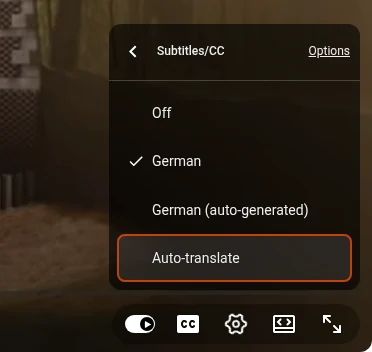
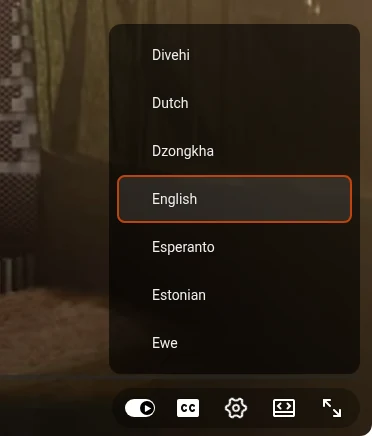
The translation is made by machine from the video’s subtitles, the creator’s own or auto-generated. It’s good enough to follow a lecture or a review, but names and terms often come out wrong, and when auto-generated subtitles mishear a word, the translation repeats the mistake. If there’s no CC button in the player, the video has no subtitles, and there’s nothing to translate.
Listen to a dubbed audio track
Some videos are dubbed into other languages: the creator uploaded a dub, or YouTube made one with an AI voice. Then the player settings have an Audio track item.
- Click the gear (Settings) and open Audio track.
- Choose your language. Dubs made by YouTube are listed under Auto-dubbed.
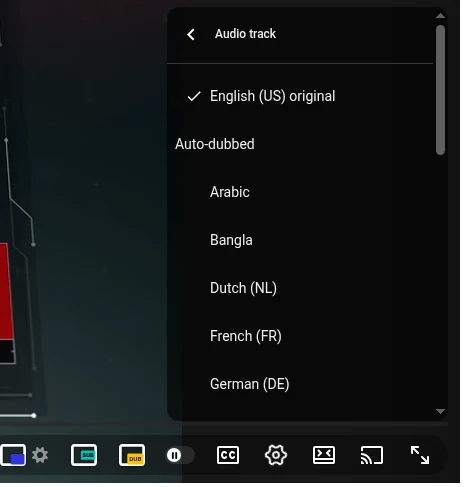
Not every video has dubs: if there’s no Audio track item in the menu, the video only has the original voice.
Hear any video with subtitles in your language
Reading subtitles means looking away from the picture, and most videos have no dub at all. I built Audio Translator for YouTube™ for exactly those videos: it translates the subtitles and reads them aloud in time with the video.

- Install Audio Translator for YouTube™ from the Chrome Web Store.
- Open a video in a language you don’t speak and click the yellow DUB button in the player.
- Check the language next to the button: by default it’s the language your YouTube is in, and the flag lets you pick another one.
- Press Listen.
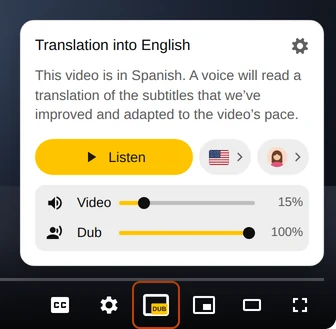
The voice reads a translation of the subtitles that we improve and adapt to the pace of the video, so it keeps up with the speaker. The Video and Dub sliders decide how loud the original and the translation are. There are lifelike female and male voices and about 50 languages to translate into. In the first seconds of a foreign-language video, the extension also offers to listen in your language right on the video. Free minutes top up regularly, and a paid plan adds more.
Questions
Why is there no Auto-translate in the menu?
Subtitles are off. Turn them on with the CC button or pick a track in Subtitles/CC, and Auto-translate appears at the bottom of the list. If the video has no subtitles at all, YouTube can’t translate it.
How do I translate a YouTube video to English?
Pick English in the Auto-translate list. Audio Translator translates into the language your YouTube is in, so if it’s set to English, the dub is in English too; otherwise choose English with the flag next to Listen.
Can I translate YouTube videos on my phone?
Yes, with YouTube’s own tools. In the app, tap the video, then the gear: the subtitles item has the same auto-translate option, and dubs are under Audio track. Item names differ slightly between app versions. Chrome extensions work only on a computer.