
Delete every chat from Settings
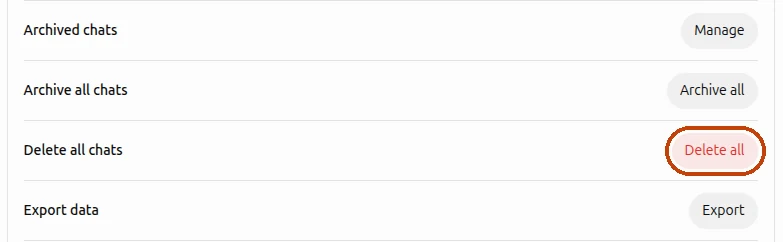
- Open chatgpt.com and click your profile picture in the bottom-left corner.
- Choose Settings, then Data controls.
- Next to Delete all chats, click Delete all and confirm.
This removes every conversation in your account at once, including chats inside projects.
Delete a few chats by hand
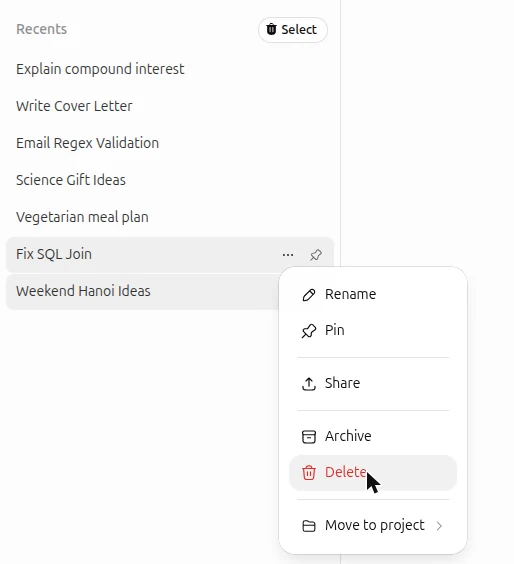
Hover over a chat in the sidebar, click the ⋯ menu next to its title, choose Delete and confirm. In the phone app, press and hold the chat instead. This works for two or three chats; with a few hundred it takes an evening.
Delete only the chats you pick, in bulk
ChatGPT can delete everything at once or one chat at a time, but nothing in between. To clear out old chats and keep the ones you still need, I built a Chrome extension that adds checkboxes to the chat list.

- Install Delete All Chats for ChatGPT™ from the Chrome Web Store.
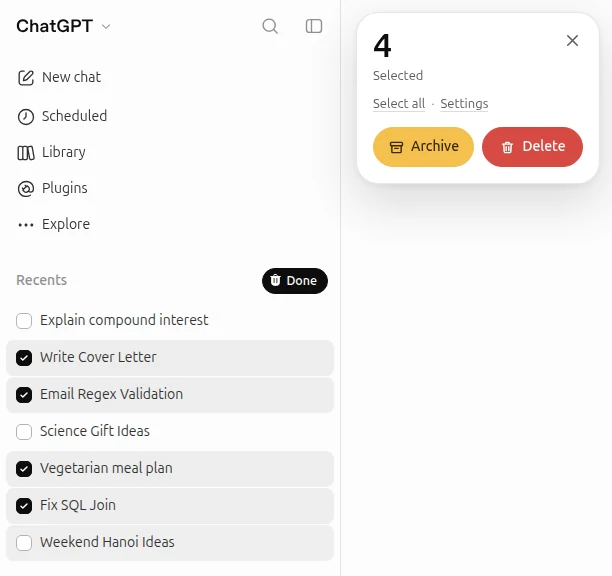
- Open chatgpt.com and click the trash icon above your chat list.
- Tick the chats you don’t need, or press Select all.
- Click Delete, or Archive to hide the chats without losing them.
The extension works in Chrome on a computer. It’s free for occasional clean-ups; for heavy use there are paid plans inside the extension.
Archive instead of deleting
Archived chats leave the sidebar but stay in your account, so you can bring them back later. To archive one chat, open its ⋯ menu and choose Archive; to archive everything, use Archive all chats in Data controls. Archived chats are here:
Settings→Data controls→Archived chats→ManageWhat happens to deleted chats
Deleted chats disappear from your history right away, on every device. According to OpenAI, they are then permanently deleted from its systems within 30 days, unless the data has already been de-identified or has to be kept for security or legal reasons.
Two things stay after you delete your chats: the memories ChatGPT saved about you and files you saved separately to your library. Delete those on their own if you want them gone too.
Questions
Can I get deleted ChatGPT chats back?
No. Neither ChatGPT nor OpenAI support can restore a deleted chat. If you might need a conversation later, archive it or export your data before deleting.
Does deleting chats clear ChatGPT’s memory?
No. Saved memories are kept separately. Review or delete them in Settings → Personalization.
Can I delete ChatGPT chats on my phone?
Yes. Deleting all chats from Settings and deleting single chats both work in the ChatGPT app. The extension for picking chats works in Chrome on a computer.